
This dataset (source) includes 44,066 results of international football matches starting from the very first official match in 1872 up to 2022. The matches range from FIFA World Cup to FIFI Wild Cup to regular friendly matches. The matches are strictly men’s full internationals and the data does not include Olympic Games or matches where at least one of the teams was the nation’s B-team, U-23 or a league select team.
Task 1: Import and prepare the dataset
- Import the
pandaspackage with the usual alias.
In [1]:
# Import the pandas package with the usual alias
import pandas as pd
- Read
"results.csv". Assign toresults. - Convert the
datecolumn to a datetime. - Get the year component of the
datecolumn; store in a new column namedyear.
In [2]:
# Read results.csv. Assign to results.
results = pd.read_csv("results.csv")
results.head()
results.dtypes
# Convert the date column to a datetime
results['date'] = pd.to_datetime(results['date'])
results.dtypes
# Get the year component of date column; store in a new column named year
results['year'] = results['date'].dt.year
results.head()

# See the result
results
Out[2]:
| date | home_team | away_team | home_score | away_score | tournament | city | country | neutral | year | |
|---|---|---|---|---|---|---|---|---|---|---|
| 0 | 1872-11-30 | Scotland | England | 0 | 0 | Friendly | Glasgow | Scotland | False | 1872 |
| 1 | 1873-03-08 | England | Scotland | 4 | 2 | Friendly | London | England | False | 1873 |
| 2 | 1874-03-07 | Scotland | England | 2 | 1 | Friendly | Glasgow | Scotland | False | 1874 |
| 3 | 1875-03-06 | England | Scotland | 2 | 2 | Friendly | London | England | False | 1875 |
| 4 | 1876-03-04 | Scotland | England | 3 | 0 | Friendly | Glasgow | Scotland | False | 1876 |
| … | … | … | … | … | … | … | … | … | … | … |
| 44061 | 2022-10-22 | Saudi Arabia | North Macedonia | 1 | 0 | Friendly | Abu Dhabi | United Arab Emirates | True | 2022 |
| 44062 | 2022-10-23 | Qatar | Guatemala | 2 | 0 | Friendly | Málaga | Spain | True | 2022 |
| 44063 | 2022-10-26 | Saudi Arabia | Albania | 1 | 1 | Friendly | Abu Dhabi | United Arab Emirates | True | 2022 |
| 44064 | 2022-10-27 | Qatar | Honduras | 1 | 0 | Friendly | Marbella | Spain | True | 2022 |
| 44065 | 2022-10-30 | Saudi Arabia | Honduras | 0 | 0 | Friendly | Abu Dhabi | United Arab Emirates | True | 2022 |
44066 rows × 10 columns
Task 2: Get the FIFA World Cup data
- Using
results, count the number of rows of each tournament value. - Convert the results to a DataFrame for nicer printing.
In [3]:
# Count the number of rows for each tournament; convert to DataFrame
results.value_counts('tournament')
#convert to Dataframe
results.value_counts('tournament').to_frame("num_maatches")
Out[3]:
| num_maatches | |
|---|---|
| tournament | |
| Friendly | 17427 |
| FIFA World Cup qualification | 7774 |
| UEFA Euro qualification | 2593 |
| African Cup of Nations qualification | 1932 |
| FIFA World Cup | 900 |
| … | … |
| AFF Championship qualification | 2 |
| TIFOCO Tournament | 1 |
| FIFA 75th Anniversary Cup | 1 |
| Copa Confraternidad | 1 |
| Real Madrid 75th Anniversary Cup | 1 |
139 rows × 1 columns
- Query for the rows where tournament is equal to “FIFA World Cup”
In [4]:
# Query for the rows where tournament is equal to "FIFA World Cup"
world_cup_res= results.query("tournament=='FIFA World Cup'")

# See the results
world_cup_res
Out[4]:
| date | home_team | away_team | home_score | away_score | tournament | city | country | neutral | year | |
|---|---|---|---|---|---|---|---|---|---|---|
| 1311 | 1930-07-13 | Belgium | United States | 0 | 3 | FIFA World Cup | Montevideo | Uruguay | True | 1930 |
| 1312 | 1930-07-13 | France | Mexico | 4 | 1 | FIFA World Cup | Montevideo | Uruguay | True | 1930 |
| 1313 | 1930-07-14 | Brazil | Yugoslavia | 1 | 2 | FIFA World Cup | Montevideo | Uruguay | True | 1930 |
| 1314 | 1930-07-14 | Peru | Romania | 1 | 3 | FIFA World Cup | Montevideo | Uruguay | True | 1930 |
| 1315 | 1930-07-15 | Argentina | France | 1 | 0 | FIFA World Cup | Montevideo | Uruguay | True | 1930 |
| … | … | … | … | … | … | … | … | … | … | … |
| 40293 | 2018-07-07 | Russia | Croatia | 2 | 2 | FIFA World Cup | Sochi | Russia | False | 2018 |
| 40294 | 2018-07-10 | France | Belgium | 1 | 0 | FIFA World Cup | Saint Petersburg | Russia | True | 2018 |
| 40295 | 2018-07-11 | Croatia | England | 2 | 1 | FIFA World Cup | Moscow | Russia | True | 2018 |
| 40296 | 2018-07-14 | Belgium | England | 2 | 0 | FIFA World Cup | Saint Petersburg | Russia | True | 2018 |
| 40297 | 2018-07-15 | France | Croatia | 4 | 2 | FIFA World Cup | Moscow | Russia | True | 2018 |
900 rows × 10 columns
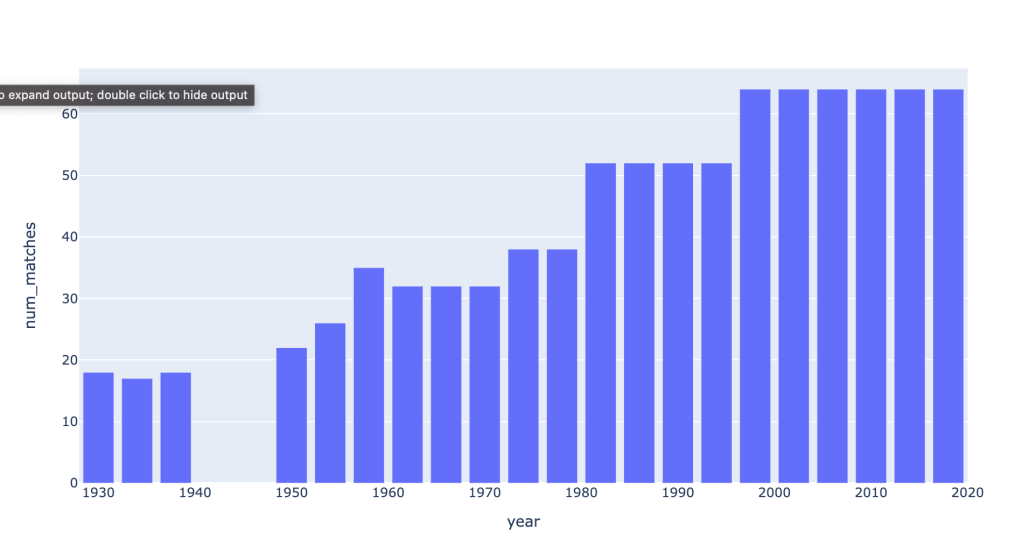
Task 3: Your turn: How many matches in every world cup?
- Using
world_cup_res, count the number of rows of each year value. - Convert the results to a DataFrame for nicer printing.
In [5]:
# Count the number of rows for each year; convert to DataFrame

matches_per_year= world_cup_res.value_counts("year").to_frame("num_matches")

# See the results
matches_per_year

#additional
# size vs count - both are same NaNs are accounted in size

world_cup_res.groupby(by='year').size().to_frame("num_matches")
Out[5]:
| year | num_matches |
|---|---|
| 1930 | 18 |
| 1934 | 17 |
| 1938 | 18 |
| 1950 | 22 |
| 1954 | 26 |
| 1958 | 35 |
| 1962 | 32 |
| 1966 | 32 |
| 1970 | 32 |
| 1974 | 38 |
| 1978 | 38 |
| 1982 | 52 |
| 1986 | 52 |
| 1990 | 52 |
| 1994 | 52 |
| 1998 | 64 |
| 2002 | 64 |
| 2006 | 64 |
| 2010 | 64 |
| 2014 | 64 |
| 2018 | 64 |
- Import the
plotly.expresspackage using the aliaspx.
In [6]:
# Import the plotly express package using the alias px
import plotly.express as px
- Using
matches_per_year, draw a bar plot ofnum_matches.
The year is in the index and will automatically be used for the x-axis.
In [7]:
# Using matches_per_year, draw a bar plot of num_matches
px.bar(matches_per_year, y="num_matches")
Task 4: Which games had the highest goal difference?
- Add a
goal_differencecolumn as the absolute value of the home score minus the away score. - Query for rows where the goal difference equals the maximum goal difference.
In [8]:
# Add a goal_difference column as the absolute value of the home score minus the away score
# Query for rows where the goal difference equals the maximum goal difference
world_cup_res\
.assign(goal_difference = lambda match: (match['home_score'] - match['away_score']).abs())\
.query('goal_difference==goal_difference.max()')
Out[8]:
| date | home_team | away_team | home_score | away_score | tournament | city | country | neutral | year | goal_difference | |
|---|---|---|---|---|---|---|---|---|---|---|---|
| 3667 | 1954-06-17 | Hungary | South Korea | 9 | 0 | FIFA World Cup | Zürich | Switzerland | True | 1954 | 9 |
| 9208 | 1974-06-18 | Yugoslavia | DR Congo | 9 | 0 | FIFA World Cup | Gelsenkirchen | Germany | True | 1974 | 9 |
| 12555 | 1982-06-15 | Hungary | El Salvador | 10 | 1 | FIFA World Cup | Elche | Spain | True | 1982 | 9 |
Task 5: Your turn: Which game had the highest total number of goals?
- Add a
total_goalscolumn as the home score plus the away score. - Query for rows where the total goals equals the maximum total goals.
In [9]:
# Add a total_goals column as the  home score plus the away score
# Query for rows where the total goals equals the maximum total goals

world_cup_res\
	.assign(total_goals = lambda match : match["home_score"] +match["away_score"])\
.query('total_goals == total_goals.max()')
Out[9]:
| date | home_team | away_team | home_score | away_score | tournament | city | country | neutral | year | total_goals | |
|---|---|---|---|---|---|---|---|---|---|---|---|
| 3680 | 1954-06-26 | Switzerland | Austria | 5 | 7 | FIFA World Cup | Lausanne | Switzerland | False | 1954 | 12 |
Task 6: Which country scored the most goals?
Step 1: Calculate the home goals by country
- Using
world_cup_res, get thehome_teamandhome_scorecolumns. - Rename as
teamandscore.
In [10]:
# Get the home_team and home_score columns
# Rename as team and score
home_goals = world_cup_res.filter(['home_team','home_score'])\
	.rename(columns={'home_team':'home', 'home_score':'score'})


# See the result
home_goals
Out[10]:
| home | score | |
|---|---|---|
| 1311 | Belgium | 0 |
| 1312 | France | 4 |
| 1313 | Brazil | 1 |
| 1314 | Peru | 1 |
| 1315 | Argentina | 1 |
| … | … | … |
| 40293 | Russia | 2 |
| 40294 | France | 1 |
| 40295 | Croatia | 2 |
| 40296 | Belgium | 2 |
| 40297 | France | 4 |
900 rows × 2 columns
Your turn: Step 2: Calculate the away goals by country
- Using
world_cup_res, get theaway_teamandaway_scorecolumns. - Rename as
teamandscore.
In [11]:
# Get the away_team and away_score columns
# Rename as team and score

away_goals = world_cup_res.filter(['away_team','away_score'])\
	.rename(columns={'away_team':'team', 'away_score':'score'})
# See the result
away_goals
Out[11]:
| team | score | |
|---|---|---|
| 1311 | United States | 3 |
| 1312 | Mexico | 1 |
| 1313 | Yugoslavia | 2 |
| 1314 | Romania | 3 |
| 1315 | France | 0 |
| … | … | … |
| 40293 | Croatia | 2 |
| 40294 | Belgium | 0 |
| 40295 | England | 1 |
| 40296 | England | 0 |
| 40297 | Croatia | 2 |
900 rows × 2 columns
Step 3: Combine the home and away totals
- Concatenate
home_goalsandaway_goals. - Group by
team,as_indexset toFalse. - Calculate the total score.
- Rename the
scorecolumn tototal_goals. - Sort the total goals so the country with the highest total shows on top.
In [12]:
# Concatenate home_goals and away_goals
# Group by team, as_index equal to False
# Get the total score
# Rename score to total_goals
# Sort by total_goals

total_goals_by_country=pd.concat([home_goals, away_goals])\
	.groupby(by='team', as_index=False)\
	.sum('score')\
	.rename(columns={"score":'total_goals'})\
	.sort_values("total_goals", ascending=False)


# See the result
total_goals_by_country
Out[12]:
| team | total_goals | |
|---|---|---|
| 27 | Germany | 68 |
| 76 | Uruguay | 56 |
| 37 | Italy | 56 |
| 8 | Brazil | 52 |
| 66 | Spain | 50 |
| … | … | … |
| 19 | DR Congo | 0 |
| 34 | Indonesia | 0 |
| 11 | Canada | 0 |
| 13 | China PR | 0 |
| 70 | Trinidad and Tobago | 0 |
79 rows × 2 columns
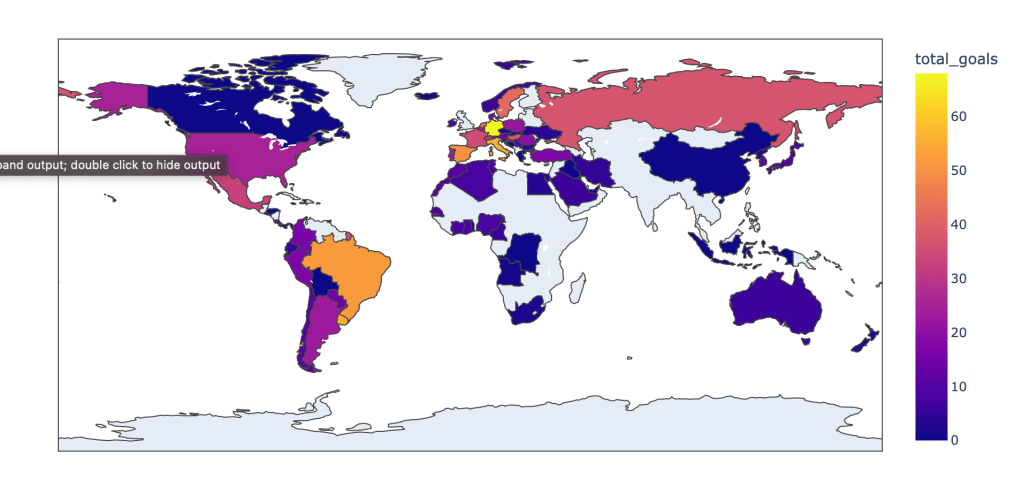
Step 4: draw a map colored by number of goals
- Draw a plotly choropleth map, colored by
total_goals, showing the team on hover.
In [13]:
# Draw a plotly choropleth map
px.choropleth(total_goals_by_country,
              locations="team",
              locationmode="country names",
              color="total_goals",
               hover_name="team")
Extra: Does playing close to home matter?
Import the data
- Import the
winners.csvfile and add the winner for 2018 based on info you find online
In [14]:
# Import the data
# source = wikipedia 🙂
winner_2018 = pd.DataFrame({"year": [2018], "hosting_country": ["Russia"], "winning_country": ["France"]})
# source = https://www.kaggle.com/datasets/abecklas/fifa-world-cup
winners = pd.read_csv("winners.csv")[["Year", "Country", "Winner"]] \
			.replace('Germany FR', 'Germany', regex=False) \
			.rename(columns = {'Year': "year", 'Country': 'hosting_country', "Winner": "winning_country"}) \
			.append(winner_2018)

winners
/var/folders/q_/3r83m4b95gz1zx4qbfv56fmw0000gn/T/ipykernel_72195/4165530431.py:5: FutureWarning:

The frame.append method is deprecated and will be removed from pandas in a future version. Use pandas.concat instead.
Out[14]:
| year | hosting_country | winning_country | |
|---|---|---|---|
| 0 | 1930 | Uruguay | Uruguay |
| 1 | 1934 | Italy | Italy |
| 2 | 1938 | France | Italy |
| 3 | 1950 | Brazil | Uruguay |
| 4 | 1954 | Switzerland | Germany |
| 5 | 1958 | Sweden | Brazil |
| 6 | 1962 | Chile | Brazil |
| 7 | 1966 | England | England |
| 8 | 1970 | Mexico | Brazil |
| 9 | 1974 | Germany | Germany |
| 10 | 1978 | Argentina | Argentina |
| 11 | 1982 | Spain | Italy |
| 12 | 1986 | Mexico | Argentina |
| 13 | 1990 | Italy | Germany |
| 14 | 1994 | USA | Brazil |
| 15 | 1998 | France | France |
| 16 | 2002 | Korea/Japan | Brazil |
| 17 | 2006 | Germany | Italy |
| 18 | 2010 | South Africa | Spain |
| 19 | 2014 | Brazil | Germany |
| 0 | 2018 | Russia | France |
Who had the most wins?
- Do a grouped count by
winning_country.
In [15]:
# Do a grouped count
winners.groupby('winning_country').size().sort_values()
Out[15]:
winning_country
England      1
Spain        1
Argentina    2
France       2
Uruguay      2
Germany      4
Italy        4
Brazil       5
dtype: int64
Add continent information
- Query the World Nations integration to get a list of countries with their respective contintent
In [18]:
country_continents= pd.read_csv('countries_continents.csv')
country_continents.head()
Out[18]:
| country | continent | |
|---|---|---|
| 0 | Afghanistan | Asia |
| 1 | Albania | Europe |
| 2 | Algeria | Africa |
| 3 | American Samoa | Oceania |
| 4 | Andorra | Europe |
- Using the list from the database, add two additional columns,
winning_countryandhosting_continent, to the data frame
In [19]:
# Do two merges to create the winning_continent and hosting_continent columns
extra_maps = pd.DataFrame({"country": ["England", "USA", "Korea/Japan", "Russia"], "continent": ["Europe", "North America", "Asia", "Europe"]})
country_continents_2 = country_continents.append(extra_maps)
winners_continents = winners \
	.merge(country_continents_2, how='left', left_on = 'winning_country', right_on = 'country') \
	.rename(columns = {'continent': 'winning_continent'}) \
	.drop(columns = 'country') \
	.merge(country_continents_2, how = 'left', left_on = 'hosting_country', right_on = 'country') \
	.rename(columns = {'continent': 'hosting_continent'}) \
	.drop(columns = 'country')

winners_continents
/var/folders/q_/3r83m4b95gz1zx4qbfv56fmw0000gn/T/ipykernel_72195/2585684502.py:3: FutureWarning:

The frame.append method is deprecated and will be removed from pandas in a future version. Use pandas.concat instead.
Out[19]:
| year | hosting_country | winning_country | winning_continent | hosting_continent | |
|---|---|---|---|---|---|
| 0 | 1930 | Uruguay | Uruguay | South America | South America |
| 1 | 1934 | Italy | Italy | Europe | Europe |
| 2 | 1938 | France | Italy | Europe | Europe |
| 3 | 1950 | Brazil | Uruguay | South America | South America |
| 4 | 1954 | Switzerland | Germany | Europe | Europe |
| 5 | 1958 | Sweden | Brazil | South America | Europe |
| 6 | 1962 | Chile | Brazil | South America | South America |
| 7 | 1966 | England | England | Europe | Europe |
| 8 | 1970 | Mexico | Brazil | South America | North America |
| 9 | 1974 | Germany | Germany | Europe | Europe |
| 10 | 1978 | Argentina | Argentina | South America | South America |
| 11 | 1982 | Spain | Italy | Europe | Europe |
| 12 | 1986 | Mexico | Argentina | South America | North America |
| 13 | 1990 | Italy | Germany | Europe | Europe |
| 14 | 1994 | USA | Brazil | South America | North America |
| 15 | 1998 | France | France | Europe | Europe |
| 16 | 2002 | Korea/Japan | Brazil | South America | Asia |
| 17 | 2006 | Germany | Italy | Europe | Europe |
| 18 | 2010 | South Africa | Spain | Europe | Africa |
| 19 | 2014 | Brazil | Germany | Europe | South America |
| 20 | 2018 | Russia | France | Europe | Europe |
Analyze South American wins
In [20]:
# How many SA wins in non-SA hosting places?
total_tournaments = winners_continents.shape[0]
total_sa_tournaments = winners_continents.query("hosting_continent == 'South America'").shape[0]
total_sa_wins = winners_continents.query("winning_continent == 'South America'").shape[0]
total_sa_wins_in_sa = winners_continents.query("winning_continent == 'South America' & hosting_continent == 'South America'").shape[0]

print(f"South American teams won {total_sa_wins} world cups in total")
print(f"{total_sa_wins_in_sa} of these were won in South America")
print(f"{total_sa_wins - total_sa_wins_in_sa} of these were won elsewhere")
print(f"{total_sa_wins_in_sa}/{total_sa_tournaments} of South America hosted world cups were won by South American teams.")
South American teams won 9 world cups in total
4 of these were won in South America
5 of these were won elsewhere
4/5 of South America hosted world cups were won by South American teams.
Analyze European wins
In [21]:
# How many Europe wins in non-Europe hosting places?
total_tournaments = winners_continents.shape[0]
total_eu_tournaments = winners_continents.query("hosting_continent == 'Europe'").shape[0]
total_eu_wins = winners_continents.query("winning_continent == 'Europe'").shape[0]
total_eu_wins_in_eu = winners_continents.query("winning_continent == 'Europe' & hosting_continent == 'Europe'").shape[0]

print(f"European teams won {total_eu_wins} world cups in total")
print(f"{total_eu_wins_in_eu} of these were won in Europe")
print(f"{total_eu_wins - total_eu_wins_in_eu} of these were won elsewhere")
print(f"{total_eu_wins_in_eu}/{total_eu_tournaments} of Europe hosted world cups were won by European teams.")
European teams won 12 world cups in total
10 of these were won in Europe
2 of these were won elsewhere
10/11 of Europe hosted world cups were won by European teams.
Overall, it’s hard to make statements about this because of the small sample size and the hosting continent class imbalance…
 Ram Rallabandi
Leave a comment